Shrinking the LLRT Binary Size

With each release, the binary for LLRT (the Lambda Low Latency Runtime) has been increasing in size. It gains important new features and functionality, but if you don't use those features, they add bloat. In this post, I'll show you how to build a custom LLRT binary with only the dependencies you use to claw back some of the bloat and reduce your coldstart latency.
Update 10/27/2028
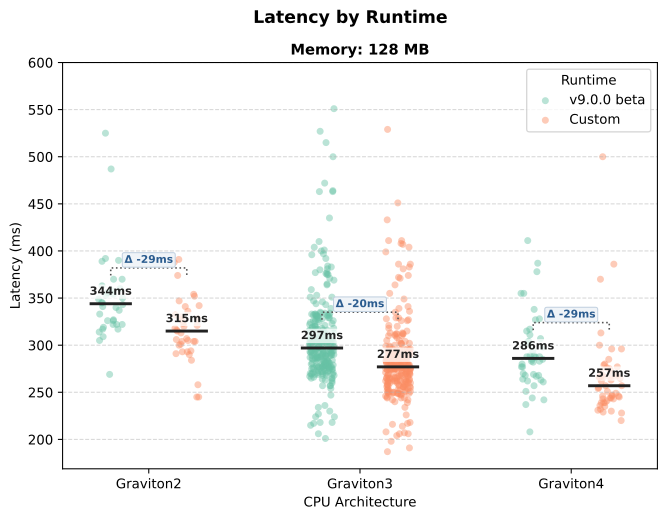
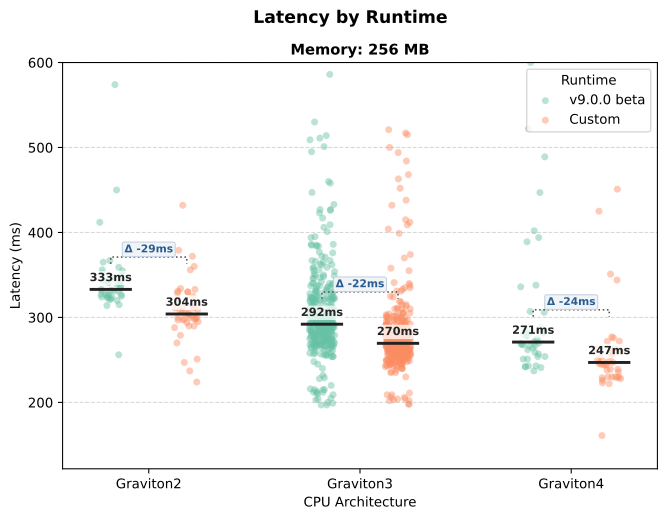
An earlier version of this post didn't take into consideration that the Lambda fleet runs on different CPU generations with different probabilities. This caused the median coldstart latency improvement to be understated. I've rerun the benchmark to compare by CPU generation and updated the results.
The Background
If you've been following my posts, you know I like to squeeze every last bit of performance out of my Lambda functions. Last year when I was finally able to migrate my API written in JavaScript from Node.js to LLRT, I saw a 50% latency reduction! Alas, the latest LLRT binary was over 1MB larger than the version I had first attempted to migrate with. From previous research, I knew the Lambda deployment package size directly impacts E2E coldstart latency. Furthermore, the latency impact is largely hidden because the Init Duration metric Lambda surfaces doesn't include the time spent downloading the code. While I was fixing a few bugs in the LLRT runtime, I learned how to build a custom LLRT binary. By making some changes to the source code I was able to create a deployment package that was 1.5 MB smaller. Read on if you need to do the same. Be cognizant however, it's a lot of work for 20-29 ms of latency reduction.
Stripping it down
In the next sections, I'll apply 3 techniques to reduce the size of the Lambda deployment package. I'll remove unnecessary SDK packages from LLRT, precompile my JavaScript source and remove unused LLRT modules.
Removing unnecessary SDK dependencies
The pre-built LLRT binaries come in 3 flavors. If you don't need the AWS SDK, the *-no-sdk releases don't bundle it and you should start there. However, if you're interacting with AWS services like me, you'll need either the standard or *-full-sdk releases. Those one-size fits all releases are likely to include AWS SDK packages you don't need so we'll remove them.
Omitting AWS SDK packages
- Before making any modifications, check out the LLRT source code, familiarize yourself with the build process and try building it. I recommend following the process to step 7, and, if you use
.zipfiles onarmlike me build it usingmake llrt-lambda-arm64.zip. - Now that you've got a working build, edit the
sdk.cfgfile. Any AWS SDK client packages you don't need, set the value to1.
For example, if you aren't importing the CloudWatch Logs client (In most scenarios you are logging directly to STDOUT and having Lambda push to CloudWatch Logs) omit it like this:client-cloudwatch-logs,CloudWatchLogs,logs,1 - Save the
sdk.cfgfile and build the LLRT binary usingmake llrt-lambda-arm64.zip. This builds the standard binary and only includes SDK packages marked as0.
Warning
Changes to sdk.cfg don't force a rebuild of the zip file. To have any changes take effect, delete llrt-lambda-arm64.zip (or the equivalent file for your architecture) before running make llrt-lambda-arm64.zip.
Tip
If you are using the CDK and cdk-lambda-llrt Use the following attributes to use your custom binary (tweak the path and architecture as needed):
llrtBinaryType: LlrtBinaryType.FULL_SDK,
llrtBinaryPath: '/path/to/custom/llrt/bootstrap',
architecture: Architecture.ARM_64,
Precompiling the source
When you bundle your Lambda function using esbuild it tree-shakes and minifies your code to reduce the bundle size. LLRT offers precompilation as an additional optimization. You can precompile the JavaScript source to bytecode to further reduce the size and eliminate the parse step during coldstarts.
To do this, first build LLRT for your OS and use the llrt compile command to precompile the source:
- Run
make releaseto build it for your OS. On MacOS, it creates the binary intarget/aarch64-apple-darwin/release/llrt. - Using the bundled output from esbuild, compile the source using a command like this:
./target/aarch64-apple-darwin/release/llrt compile /path/to/index.mjs /path/to/index.lrt(tweak the command as needed based where your OS build directory is).
The resulting .lrt file will likely be smaller than the original .mjs file. For my API it was 50% of the size, but I don't minify my source. You can use the .lrt file in your Lambda deployment package.
Tip
If you are using the CDK and cdk-lambda-llrt, add the following commandHooks to your bundling options to precompile the source. Tweak the path and architecture as needed for your environment.
commandHooks: {
    beforeBundling(inputDir: string, outputDir: string): string[] {
      return [];
    },
    beforeInstall(inputDir: string, outputDir: string): string[] {
        return [];
    },
    afterBundling(inputDir: string, outputDir: string): string[] {
        return [
            // 1. Precompile the source to bytecode
            `/<path/to/llrt/repository>/target/aarch64-apple-darwin/release/llrt compile ${outputDir}/index.mjs ${outputDir}/index.lrt`,
            // 2. Remove the original .mjs file so only bytecode is deployed
            `rm ${outputDir}/index.mjs`,
        ];
    },
},
Removing unused LLRT modules
Feel free to skip this if you don't want to roll up your sleeves. Omitting modules is much more involved and may require merging changes with each new LLRT release.
- Using the AI of your choice, point it at the directory where you downloaded the LLRT source code and provide it with your bundled Lambda function. I used Gemini 3.7 Flash with a prompt similar to this:
Modify the LLRT source code to omit native modules that aren't used by the Lambda function found in @/path/to/bundled/index.mjs. The files to modify are found at @llrt_modules/Cargo.toml and @llrt_core/src/modules/mod.rs Do not remove modules required by llrt_core. - Review the changes and then rebuild the LLRT binary with
make llrt-lambda-arm64.zip.
My changes looked something like this:
--- a/llrt_modules/Cargo.toml
+++ b/llrt_modules/Cargo.toml
@@ -39,37 +39,25 @@ openssl-vendored = ["dep:openssl", "openssl/vendored"]

 base = [
   "abort",
-  "assert",
   "async-hooks",
   "buffer",
-  "child-process",
   "crypto",
-  "dgram",
-  "dns",
   "events",
   "exceptions",
   "fetch",
   "fs",
   "https",
-  "intl",
   "navigator",
   "net",
-  "os",
   "path",
-  "perf-hooks",
   "process",
   "stream-web",
-  "string-decoder",
-  "temporal",
   "timers",
   "tls",
-  "tty",
   "url",
   "util",
-  "zlib",
 ]

-
 # Modules
 abort = ["llrt_abort"]
 assert = ["llrt_assert"]
--- a/llrt_core/src/modules/mod.rs
+++ b/llrt_core/src/modules/mod.rs
@@ -2,10 +2,10 @@
 // SPDX-License-Identifier: Apache-2.0
 #[cfg(not(feature = "lambda"))]
 pub use llrt_modules::console;
+
 pub use llrt_modules::{
-    abort, assert, async_hooks, buffer, child_process, crypto, dns, events, exceptions, fetch, fs,
-    https, intl, module, navigator, net, os, path, perf_hooks, process, stream_web, string_decoder,
-    temporal, timers, tls, tty, url, util, zlib,
+    abort, async_hooks, buffer, crypto, events, exceptions, fetch, fs, https, module, navigator,
+    net, path, process, stream_web, timers, tls, url, util,
 };
 pub use llrt_modules::{module_builder, package, CJS_IMPORT_PREFIX, CJS_LOADER_PREFIX};
Tip
After running cdk synth I locate the latest index.mjs of my bundled Lambda function by running ls -dt cdk.out/asset* | head -n 1
Benchmarking
I created a simple Lambda function that uses the Secure Token Service (STS) GetCallerIdentity to demonstrate a service call. I followed the instructions above to remove unnecessary SDK packages, precompile the source and remove unused LLRT modules. I then deployed the Lambda function using the custom LLRT binary and compared it to a deployment using the standard v9.0-beta LLRT binary release.
Code size
The v.9.0-beta release of LLRT with the standard AWS SDK has a deployment package size of 5.8 MB. With the custom LLRT binary, the size of the deployment package is 4.3 MB. The delta of 1.5 MB is a 35% reduction in size.
Coldstart latency
I ran the Lambda function in us-east-2 on arm with 128 MB and 256 MB of memory. When comparing to the same CPU generation, I saw a 20-29 ms reduction (6.7-10.1%) in median coldstart latency.
An Interesting Observation
Across 1538 coldstarts, I saw the following distribution of CPU generations:
| CPU Generation | Count | Percentage |
|---|---|---|
| Graviton2 | 156 | 10.14% |
| Graviton3 | 1,210 | 78.67% |
| Graviton4 | 172 | 11.18% |
| Total | 1,538 | 100.0% |
It appears the fleet is not entirely homogeneous and you'll see different performance depending on which CPU generation your Lambda function is placed on. I expect the percentages to change over time as AWS continues to upgrade the fleet.
Conclusion
By removing unnecessary SDK packages, precompiling the source and removing unused LLRT modules, I was able to reduce the size of my Lambda deployment package by about 35%. This reduced my coldstart latency by 20-29 ms. If you need to run JavaScript in Lambda with the lowest possible latency, consider using some of these techniques to reduce the size of your deployment package. But keep in mind, simply removing environment variables will be easier and save you 20 ms. If you have feedback or questions, reach out to me on BlueSky especially if you know how to make it faster.
Further Reading
- If you haven't migrated to LLRT yet, read my article on it Migrating to LLRT to see if it is right for you.
- Learn what is and what isn't included in your Init Duration in my article about the Lambda request timeline.